When a security event occurs in your Amazon Web Services (AWS) environment, rapid response is critical. However security teams often struggle with time-consuming, manual processes that slow down investigations. Analysts must recall complex AWS Command Line Interface (AWS CLI) syntax for multiple services, manually correlate findings across Amazon GuardDuty, AWS CloudTrail, and other security tools, and document every investigation step for compliance requirements. They make critical decisions under pressure while active threats continue. For analysts without deep AWS expertise, these challenges are even more pronounced, creating bottlenecks in your security operations.
Kiro is an AI-powered coding assistant that helps users write, understand, and optimize code through integrated development environment (IDE) and command line integrations. Beyond traditional development tasks, it offers AWS-specific expertise including architecture guidance, best practices, cost optimization recommendations, and service documentation navigation. Kiro CLI puts Kiro’s full capabilities in your terminal, making it a natural fit for security operations workflows. For example, with built-in tools, Kiro CLI can be used to help with investigation of a GuardDuty finding—it will propose the appropriate AWS CLI commands, explain what each command does, and wait for your approval before executing. This approach lets you focus on analyzing threats rather than figuring out how to investigate them.
This blog post demonstrates how to use Kiro CLI to conduct a security investigation following the AWS Security Incident Response Guide framework. This framework organizes incident response into five phases:
- Preparation: Having the right tools and processes in place before an incident occurs
- Detection and analysis: Identifying security events and understanding their scope
- Containment: Limiting the impact of an incident and preventing further damage
- Eradication and recovery: Removing threats and restoring normal operations
- Post-incident activity: Learning from incidents to improve future response
You’ll see how you can use Kiro CLI to triage GuardDuty findings, assess impacted Amazon Elastic Compute Cloud (Amazon EC2) resources, analyze AWS CloudTrail logs, and generate remediation scripts. By the end of this post, you’ll learn how to use Kiro CLI to run security investigations in minutes rather than hours — without skipping steps.
Prerequisites
Before getting started, confirm you have the following:
- Install Kiro CLI (available for macOS, Linux and Windows)
- Kiro access, either:
- Create a free AWS Builder ID account
- Use your organization’s Kiro Pro subscription
- AWS CLI: Configure using one of the methods in Configuring settings for the AWS CLI. Kiro CLI uses the default AWS CLI profile (or the profile specified by the
AWS_PROFILEenvironment variable) to interact with AWS resources and will request your approval before executing any actions.
Solution overview
To show Kiro CLI in action, we investigate a GuardDuty finding end to end — following the AWS Security Incident Response Guide framework through the following steps.
- Discovery: Retrieve and analyze a high-severity GuardDuty finding
- Resource analysis: Examine EC2 instance configuration, security groups, and AWS Identity and Access Management (IAM) permissions
- Containment: Isolate the compromised instance and revoke excessive permissions
- Evidence preservation: Create forensic snapshots using Amazon Elastic Block Store (Amazon EBS) snapshots
- Scope assessment: Analyze CloudTrail logs to determine event scope
- Proactive defense: Establish automated alerting using Amazon Simple Notification Service (Amazon SNS) and Amazon EventBridge
- Knowledge capture: Create reusable investigation workflows through steering files
Throughout this investigation, Kiro CLI will propose commands, explain their purpose, wait for approval, and automatically document findings—transforming an inefficient manual process into a guided, efficient workflow.
Kiro CLI combines AI reasoning with deep AWS knowledge to analyze security findings, correlate evidence across services, and propose appropriate AWS CLI commands at each step of an investigation. While this AI-powered approach accelerates investigations, it’s important to validate outputs and recommendations before taking action. The specific commands and analysis shown in this walkthrough are examples—your results will vary based on your specific findings and environment configuration.
The investigation: From alert to resolution
In this section, we walk you through the phases of an investigation, from discovery through analysis.
Discovery: A high-severity GuardDuty finding
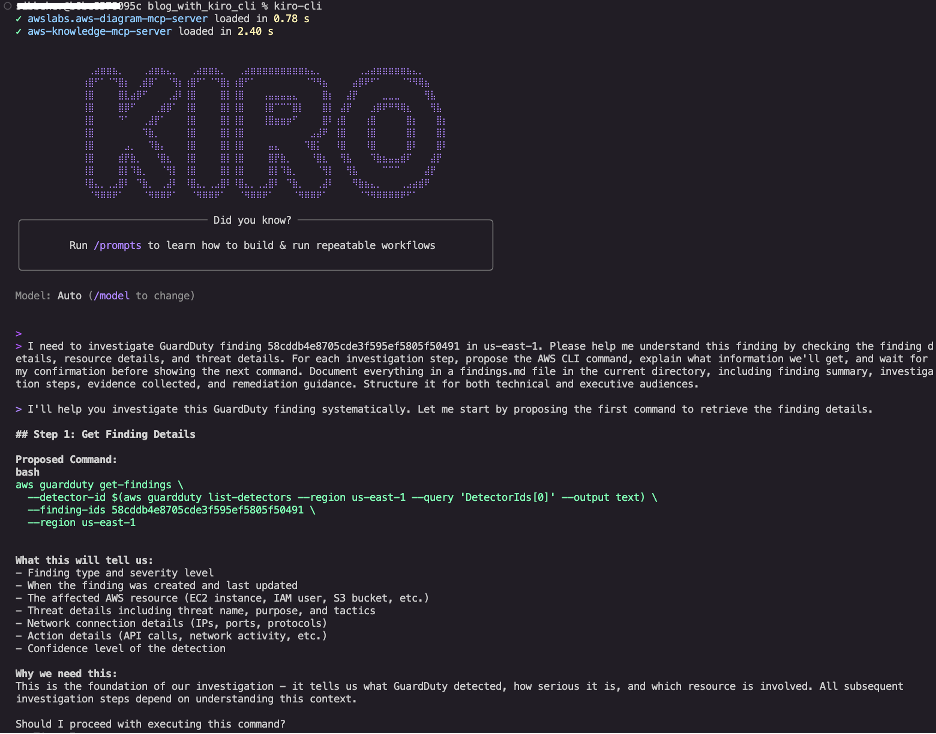
Our investigation began with a GuardDuty finding requiring immediate attention. Rather than manually constructing AWS CLI commands, we used Kiro CLI’s natural language interface:
This single prompt establishes the entire investigation framework, as shown in Figure 1. By requesting step-by-step approval, we maintain control while benefiting from AI guidance. The documentation requirement helps ensure that we’re building an audit trail in real-time for compliance requirements.
Figure 1: Kiro CLI interface showing the initial investigation prompt and proposed first command to retrieve GuardDuty detector ID and finding details
Kiro CLI proposed retrieving the detector ID and complete finding details. After approval, it executed the commands and revealed critical information, as shown in Figure 2.Key findings:
- Type: CryptoCurrency:EC2/BitcoinTool.B!DNS
- Severity: HIGH (8.0)
- Instance: i-05447e6dacd0a7e7e (m5.xlarge)
- Threat: 617 DNS queries to pool.minergate.com
- Timeline: Started 9 minutes after instance launch
We can see that it took 9 minutes from instance launch to mining activity, which suggests automated event rather than manual action. This timeline information, automatically extracted and highlighted by Kiro CLI, helps security teams understand event patterns.
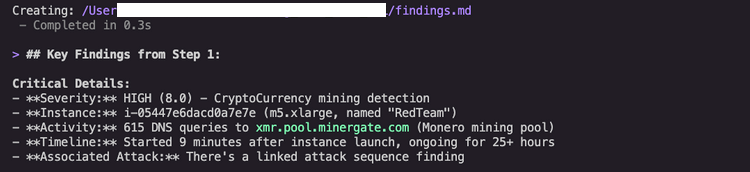
Figure 2: GuardDuty finding details showing HIGH severity cryptocurrency mining detection with threat indicators and timeline
Resource and scope analysis
Kiro CLI proposed investigating the EC2 instance configuration, security groups, IAM permissions, and checking for additional findings. This proactive suggestion demonstrates Kiro CLI’s understanding of security investigation workflows, it knows that understanding the potential impact requires examining not just what the unauthorized user did, but what might possibly be a next step in a typical threat scenario.
The following information is also shown in Figure 3.
Instance configuration: Kiro CLI retrieved the instance details, revealing:
- Amazon Linux 2023 AMI
- Instance Metadata Service version 2 (IMDSv2) required (good security posture)
- Public IP address with unrestricted outbound access
- IAM instance profile attached
Security group assessment: Kiro CLI analyzed the security group rules and identified:
- No inbound rules
- Unrestricted outbound access to 0.0.0.0/0, enabling mining traffic
IAM permission analysis: Kiro CLI examined the instance profile and attached role policies, uncovering a critical security risk:
- Critical finding: AdministratorAccess policy attached to the EC2 instance profile
- Full AWS account access from compromised instance
- Potential for complete account takeover
While the observed activity is cryptocurrency mining, the attached AdministratorAccess policy means the unauthorized user could have exfiltrated data, created backdoors, or compromised other resources. This highlights why least-privilege IAM policies are critical. Even if an instance is compromised, limited permissions help reduce the potential impact.
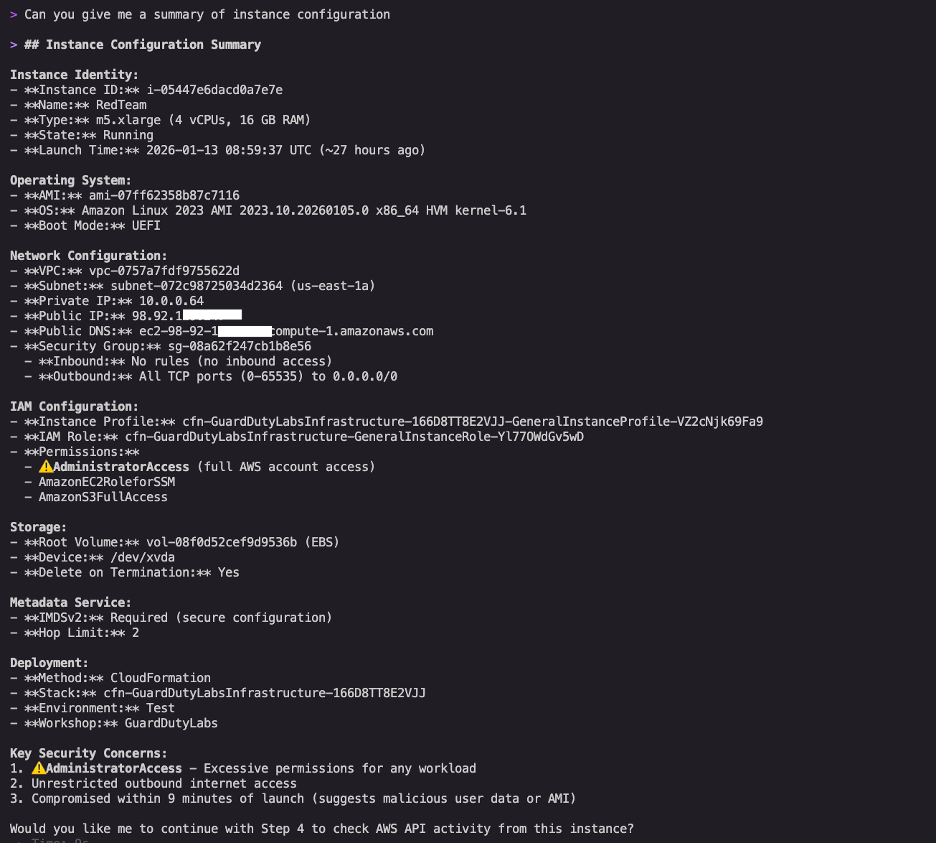
Figure 3: Kiro CLI’s instance configuration summary highlighting the AdministratorAccess policy, unrestricted outbound access, and multiple concurrent security findings
Scope assessment: Kiro CLI checked for additional unexpected activity and discovered seven security findings on this single instance, indicating a multi-vector attack, as shown in Figure 4.
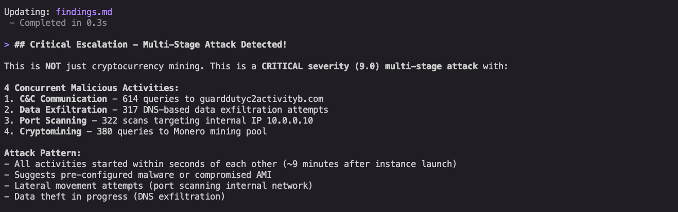
Figure 4: Kiro CLI’s summary highlighting a multi-vector attack.
Containment actions
Kiro CLI proposed a systematic remediation plan aligned with the knowledge obtained by following AWS Security Incident Response Guide’s containment strategy, as shown in Figure 5.
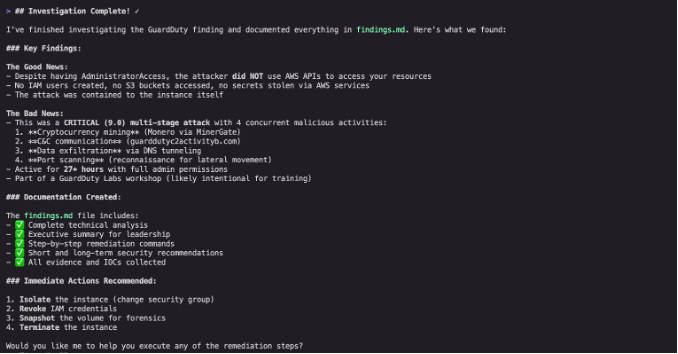
Figure 5: Kiro CLI’s summary of the investigation and recommendations for immediate actions.
Instance isolation: Kiro CLI produced commands to create an isolation security group with no inbound or outbound rules (as shown in Figure 6), then applied it to the compromised instance. This containment step stops new connections without destroying evidence. However, it’s important to understand that security groups are stateful and use connection tracking. When you change security group rules, existing connections aren’t immediately interrupted and continue to allow packets until they time out.
This means that if an unauthorized user has an active connection to the instance, that connection might persist temporarily even after applying the isolation security group. For immediate interruption of all traffic including active connections, consider also implementing network access control lists (NACLs), which are stateless and don’t track connection state. Unlike security groups, NACLs can immediately break existing connections when rules are applied. While NACLs operate at the subnet level (broader scope than instance-level security groups), they provide an additional layer of defense that helps ensure network isolation.
This scenario illustrates an important principle: while AI-powered tools such as Kiro CLI can help you respond more quickly by generating appropriate commands, it’s critical to keep a human in the loop who understands these nuances. Kiro CLI might not have complete information about edge cases, so security professionals should validate recommendations and consider additional controls based on their expertise and the specific threat scenario.
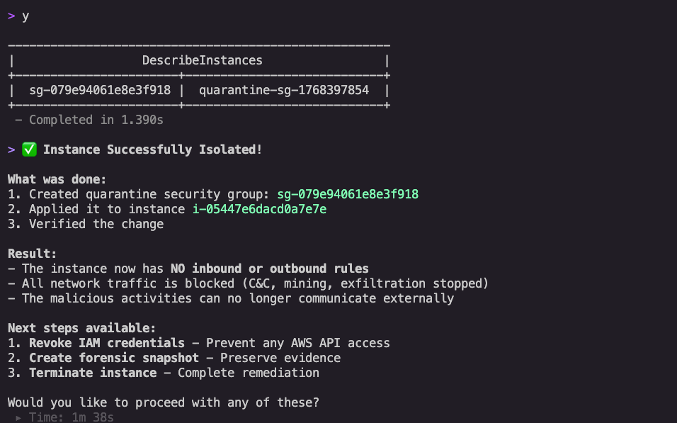
Figure 6: Instance successfully isolated with confirmation showing no inbound or outbound rules, blocking all network traffic including command-and-control (C&C) communications and mining activity
Privilege revocation: Kiro CLI generated commands to attach a deny-all policy to the compromised IAM role (as shown in Figure 7). The AI assistant explained that even though the AdministratorAccess policy remains attached, the deny-all policy takes precedence because of the evaluation logic used by IAM, where explicit denies always override any allows. This immediately revoked all permissions while preserving the original configuration for forensic analysis.
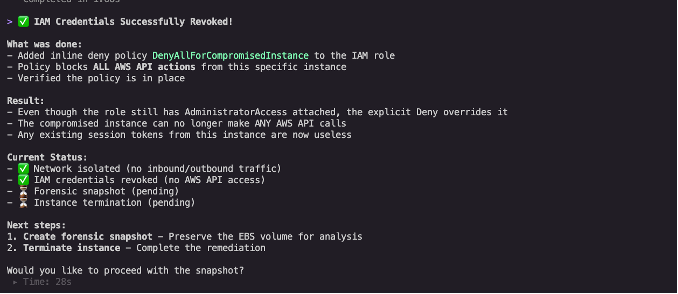
Figure 7: IAM credentials revocation confirmation with current status checklist showing network isolated, IAM credentials revoked, and forensic snapshot pending
Evidence preservation
Before making mutating changes, Kiro CLI recommended creating a forensic snapshot of the compromised instance’s Amazon EBS volume (as shown in figure 8). This step can be missed when teams are under pressure to contain an active threat, but it’s critical for post-incident analysis and potential legal proceedings.
Memory preservation decision: We chose to leave the instance running in its isolated state rather than stopping it immediately. Stopping an EC2 instance results in loss of volatile memory containing forensic evidence such as running processes, network connections, loaded malware, and encryption keys. By maintaining the instance in an isolated security group with all network access blocked, we neutralized the threat while preserving the ability to conduct deeper forensic investigation if needed.
Volatile memory often contains evidence that explains how an event occurred, malware binaries, decryption keys, or command-and-control (C&C) communications that disappear when an instance stops. This decision point illustrates the balance between immediate threat elimination and thorough investigation.
Capturing volatile memory requires specialized tools and techniques. For Linux instances, LiME (Linux Memory Extractor) can capture physical memory, while Windows instances can use tools like Winpmem. After being captured, memory dumps can be analyzed using Volatility, an open source memory forensics framework. Forensics tools should be pre-installed on your systems to avoid changes being made during the evidence gathering process. AWS provides guidance on automating forensic kernel module builds for Amazon Linux EC2 instances to streamline this process.
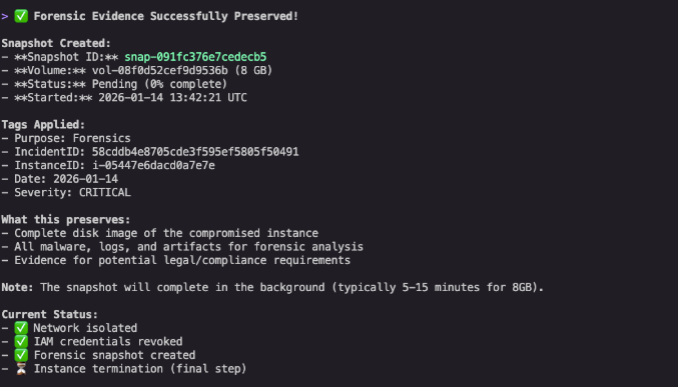
Figure 8: Forensic snapshot creation confirmation with proper tagging including purpose, incident ID, and severity for evidence preservation
CloudTrail analysis
To understand the full scope of compromise, we asked Kiro CLI to analyze CloudTrail logs. The AI assistant identified available CloudTrail trails and proposed queries to find any API calls made from the compromised instance using its temporary credentials (as shown in Figure 9).
CloudTrail analysis is often the most time-consuming part of incident investigation, requiring analysts to construct complex queries and correlate events across time. Kiro CLI automates this process, immediately identifying the relevant log sources and proposing appropriate queries.
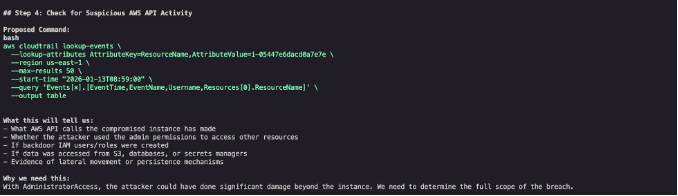
Figure 9: Kiro CLI identifying available CloudTrail trails and proposing targeted queries
Kiro CLI found no unexpected API calls originating from the instance credentials—no IAM users created, no S3 buckets accessed, and no secrets stolen. The event appeared limited to cryptocurrency mining activity conducted through DNS queries, with no evidence of data exfiltration or lateral movement.

Figure 10: Investigation results from Kiro CLI
This shows the value of thorough CloudTrail analysis: even when initial findings suggest a contained threat, confirming the absence of broader compromise is essential before closing an investigation.
Building proactive defenses
The AWS Security Incident Response Guide emphasizes that preparation is the foundation of effective incident response. With the immediate threat contained, we used Kiro CLI to strengthen our preparation phase by establishing automated alerting for future incidents.
As shown in Figure 11, we used natural language to request
Kiro CLI understood the requirement and proposed a multi-step solution involving Amazon SNS and EventBridge:
- Create an SNS topic for GuardDuty alerts
- Subscribe an email address to the topic
- Create an EventBridge rule to trigger on high-severity findings (severity greater than or equal to 7.0)
- Configure the SNS topic as the EventBridge target
- Grant EventBridge permissions to publish to the SNS topic
Building automated alerting requires understanding multiple AWS services, their interactions, and correct configuration syntax. Kiro CLI translates a straightforward natural language request into a complete, production-ready solution.
Auto-correction and testing: When setting up complex integrations, commands can fail because of permission issues, incorrect Amazon Resource Name (ARN) references, or malformed JSON policies. Kiro CLI automatically detects these failures and proposes corrected commands.
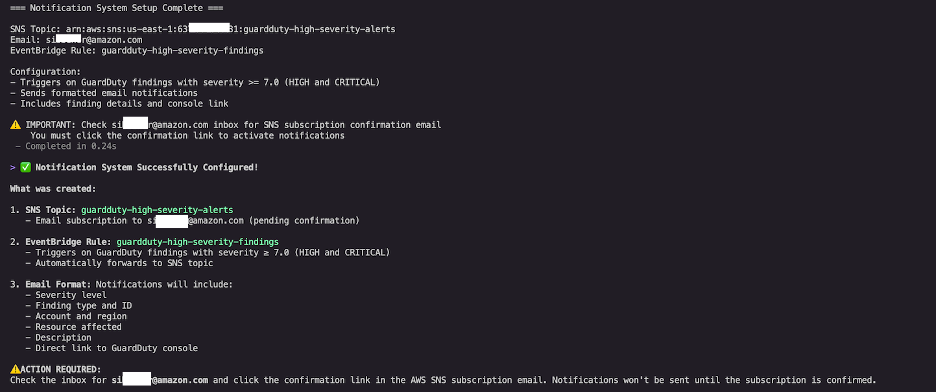
Figure 11: Notification system setup completion showing SNS topic created, EventBridge rule configured, and confirmation that notifications will trigger on HIGH and CRITICAL severity findings
You can also prompt Kiro CLI to test the setup: Test this notification system to verify it’s working correctly. Kiro CLI will verify that the SNS subscription is confirmed, check that the EventBridge rule is properly configured, validate IAM permissions, identify any misconfigurations, and publish a test event to verify end-to-end functionality. This intelligent error handling means security teams can confidently deploy automation without manual troubleshooting.
Creating reusable investigation workflows
With the immediate threat contained and proactive defenses in place, we then used Kiro CLI to create a reusable steering file that codifies this investigation workflow for future incidents. Steering files are Markdown files stored in .kiro/steering/ that act as persistent memory for Kiro CLI, helping security teams capture institutional knowledge and standardize response procedures. To share them across your team, add them to a Git repository or publish them to your documentation system like Confluence — the same places you’d keep any other runbook.
We recommend running the full investigation and generating the steering file in the same Kiro CLI session. This way, the steering file captures the exact steps, commands, and decisions from your investigation. Navigate the process the way that fits your organization — the steering file will reflect your workflow, not a generic template.
We asked Kiro CLI:
Kiro CLI generated a detailed steering file at .kiro/steering/guardduty-incident-response.md that includes:
- Investigation phases aligned with the AWS Security Incident Response Guide
- AWS CLI command patterns for GuardDuty, Amazon EC2, IAM, and CloudTrail
- Documentation requirements and approval gates
- Containment, eradication, and evidence preservation procedures
This is the example steering file that was created by Kiro cli:
Traditional incident response playbooks are static documents that quickly become outdated. Kiro CLI steering files are executable playbooks that guide AI-assisted investigations with consistency while remaining flexible enough to adapt to specific scenarios. Steering files stay current because updating them is part of the workflow, not a separate task. When you adjust your investigation process, ask Kiro CLI to update the steering file at the end of the session. It captures your changes, and you share the updated version with the team through Git or Confluence — everyone works from the latest version.
Conclusion
Security incidents require accurate and rapid response, but traditional investigation workflows create bottlenecks that extend mean time to respond (MTTR). By following the framework provided by the AWS Security Incident Response Guide and using Kiro CLI’s AI-powered capabilities, you can transform incident response from reactive to proactive, well-documented operations.
In this post, we demonstrated how Kiro CLI accelerates each phase of the incident response lifecycle—from initial detection and analysis through containment, eradication, and recovery. You learned how to use natural language prompts to investigate GuardDuty findings, analyze compromised resources, implement containment measures, preserve forensic evidence, and establish automated alerting for future incidents. The steering file capability helps your team embed hard-won expertise in reusable workflows that benefit analysts at all skill levels.
Whether you’re investigating alerts, building defenses, or documenting procedures, Kiro CLI provides the expertise and automation to respond faster, learn continuously, build better defenses, and document thoroughly. When commands fail or configurations are wrong, Kiro CLI identifies the issue and corrects it, reducing time spent troubleshooting.
If you have feedback about this post, submit comments in the Comments section below.